
Build Advanced Customer Support LLM Multi-Agent Workflow
Background: The Scale and Stakes of Customer Support at Socure
At Socure, we verify the identity of millions of individuals every day, providing real-time identity verification and fraud detection for over 3,000 enterprises. Our platform processes enormous volumes of sensitive Personally Identifiable Information (PII) and transaction data. For many of our customers, Socure is a critical part of their business infrastructure. A single disruption can delay customer onboarding, affect risk analysis, or even halt essential services.
As the adoption of our platform grows, so does the demand on our small but mighty customer support team. Each business day, dozens to hundreds of support cases are opened. These range from technical troubleshooting and API errors to questions about product features, integration, configuration, or compliance.
Why GenAI? Why Now?
To address this growing demand, we turned to generative AI and large language models (LLMs). Our goal was not to replace our support team but to empower them. We wanted to:
- Automate routine or repetitive support tasks
- Accelerate research and drafting of responses
- Provide 24/7 support augmentation for quick turnaround
- Scale support without proportionally growing the team
After evaluating different frameworks, we chose to build our solution using LangGraph, a graph-based multi-agent orchestration library built on LangChain, and host our LLMs on AWS Bedrock, which provides scalable, secure, and fully managed access to top-tier foundation models.
Solution Overview: A Multi-Agent LLM Support Framework
Our architecture is built on the principle of task specialization: different agents are responsible for answering different types of support questions. This allows us to leverage smaller, focused retrieval-augmented generation (RAG) contexts, and ensures responses are accurate and domain-specific.
The Agents
We built six domain-specialized agents:
- DevHub Agent – Focuses on public API documentation, SDK integration issues, admin dashboard configuration, and customer-facing product behavior.
- Glean Agent – Indexes our internal knowledge base—covering product strategy, SDLC, testing practices, SRE runbooks, internal communications, HR policies, and more.
- BI Agent – Handles analytics, customer insights, product usage trends, and sales performance dashboards.
- Salesforce Agent – Connects to our CRM to answer questions about specific customer accounts, leads, sales pipelines, and opportunities.
- Troubleshooting Agent – Specializes in ID+ transaction errors, timeouts, rate-limiting, and diagnostics.
- Legal Agent – Responds to questions related to compliance, data residency, privacy programs, contractual terms, and regulated markets.
Each agent uses a combination of RAG with vector search, metadata filtering, and custom tools to reason about its domain.
LangGraph-Based Architecture
The following diagram illustrates the core flow of our LangGraph-based system:
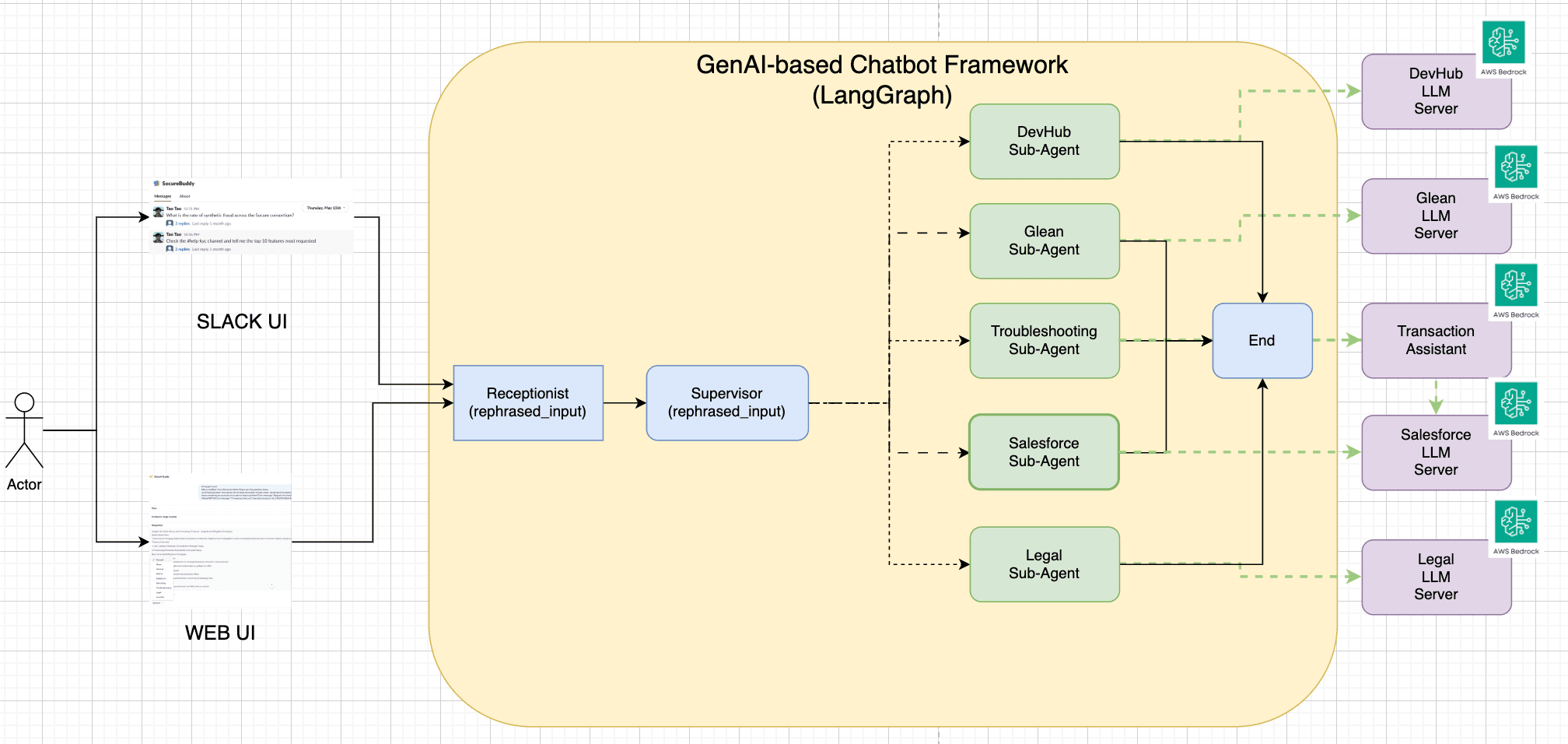
First, we define the state of the LangGraph as below:
|
|
In addition, we designed a LangGraph workflow that behaves like a task router and judge:
- Query Ingestion: A customer query comes in through Slack or the support portal. It is parsed, normalized, and sent to the LangGraph workflow.
- Receptionist Node: This node rephrase the user’s questions based on the chat history and user’s context.
- Supervisor Node (Intent Classifier): This node infers the customer’s intent using a fine-tuned LLM. Based on the topic (e.g., “Why am I getting HTTP 429 errors?”), it selects up to three most relevant agents.
- Parallel Agent Execution: The selected agents execute in parallel. Each agent retrieves relevant context (docs, dashboards, tickets) and generates a proposed answer.
- Answer Evaluation: An evaluation node compares the outputs and selects the most complete and correct answer. If no answer meets a confidence threshold, the case is escalated to a human agent.
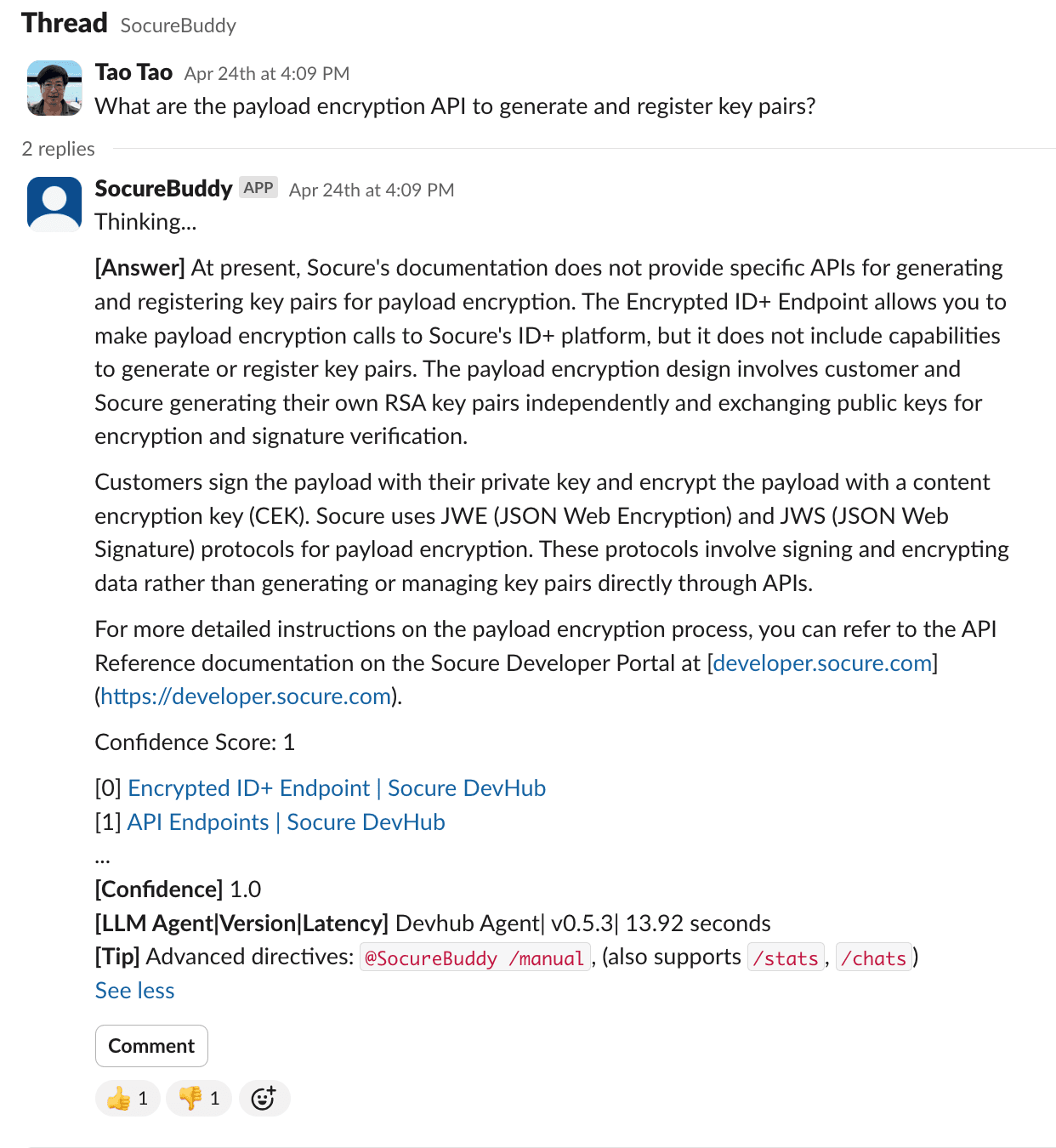
- Answer Delivery + Feedback: The selected response is sent back to the support interface, with citations and an inline feedback module (👍 / 👎 / comment). This feedback is stored for future evaluation and fine-tuning.
- Chat History + Contextual Memory: We enrich queries with historical context (previous chats, support tickets, account config, usage patterns) to help agents answer better.
Technical Challenges and How We Solved Them
1. Build a chatbot with contextual enrichment – our context builder composes payloads from chat history, account metadata, and prior tickets — and use that context to rephrase the user’s question (see sample code below)
from loguru import loggerfrom langchain.prompts import ChatPromptTemplate, MessagesPlaceholderfrom langchain.schema.output_parser import StrOutputParser
|
2. Inferring Intent to Select Relevant Agents – We trained a classifier on past support cases to map questions to categories — and we form a task force (i.e. a selected tools) to run against the question in parallel (see sample code below)
from loguru import loggerfrom langchain.prompts import ChatPromptTemplatefrom langchain.output_parsers import JsonOutputParser# LLM-based selection of top 3 taskstasks = [
|
3. Selecting the Best Answer – We apply evaluation heuristics and plan to fine-tune reward models for preference learning.
def compare_results_with_llm(question: str, results: Dict[str, Dict[str, str]]) -> str:"""Compares answers from Devhub and Enterprise agents and selects the best onebased on accuracy, relevance, and clarity using an LLM chain.
|
Evaluation, Oversight, and Feedback
A human-in-the-loop workflow is essential in regulated and high-stakes domains like identity verification. We designed our system with three layers of safety:
- Confidence Thresholds: Only high-confidence responses are sent directly to users. Others are routed to support reps for review.
- Evaluation Service: We log each agent’s answers, reasoning steps, and feedback. This allows our QA team to retrain models and refine agent scopes.
- Thumbs-Up / Down and Commentary Feedback: Users can give real-time feedback per response. This is logged and tied to conversation history.
Here is a sample UI for us to show the answer along with the citations, confidence score, and feedback options.
Results So Far
Since launching this framework in beta for our internal support team, we’ve seen:
- 50%+ automation of routine support tickets
- 70% faster response times for high-volume FAQs
- Improved customer satisfaction scores (via post-case surveys)
- Increased support team capacity without headcount growth
Our team now focuses on strategic and edge cases instead of repetitive tasks.
What’s Next: From Static Agents to Reasoning Workflows
We’re integrating advanced reasoning models:
ReWOO: Plan First, Then Execute
Some questions can’t be answered in a single step (e.g., “Why did this customer’s transaction fail in the last 24 hours?”). We’re exploring ReWOO—a reasoning model that first plans a multi-step workflow and then executes each step with specialized agents. Each agent contributes a sub-answer, which is later summarized.
ReAct: Think Step-by-Step
We also plan to implement ReAct, a framework where the LLM reasons and acts iteratively. This allows it to call tools, perform lookups, reason about outcomes, and repeat until the final solution is reached.
Final Thoughts
At Socure, we believe that customer support is a key product surface. With the power of LangGraph, AWS Bedrock, and domain-specific LLM agents, we’re transforming our support model from reactive to proactive, from manual to intelligent.
This approach enables us to scale customer service without compromising quality, even as our platform—and our customer base—continue to grow. We’re just getting started.